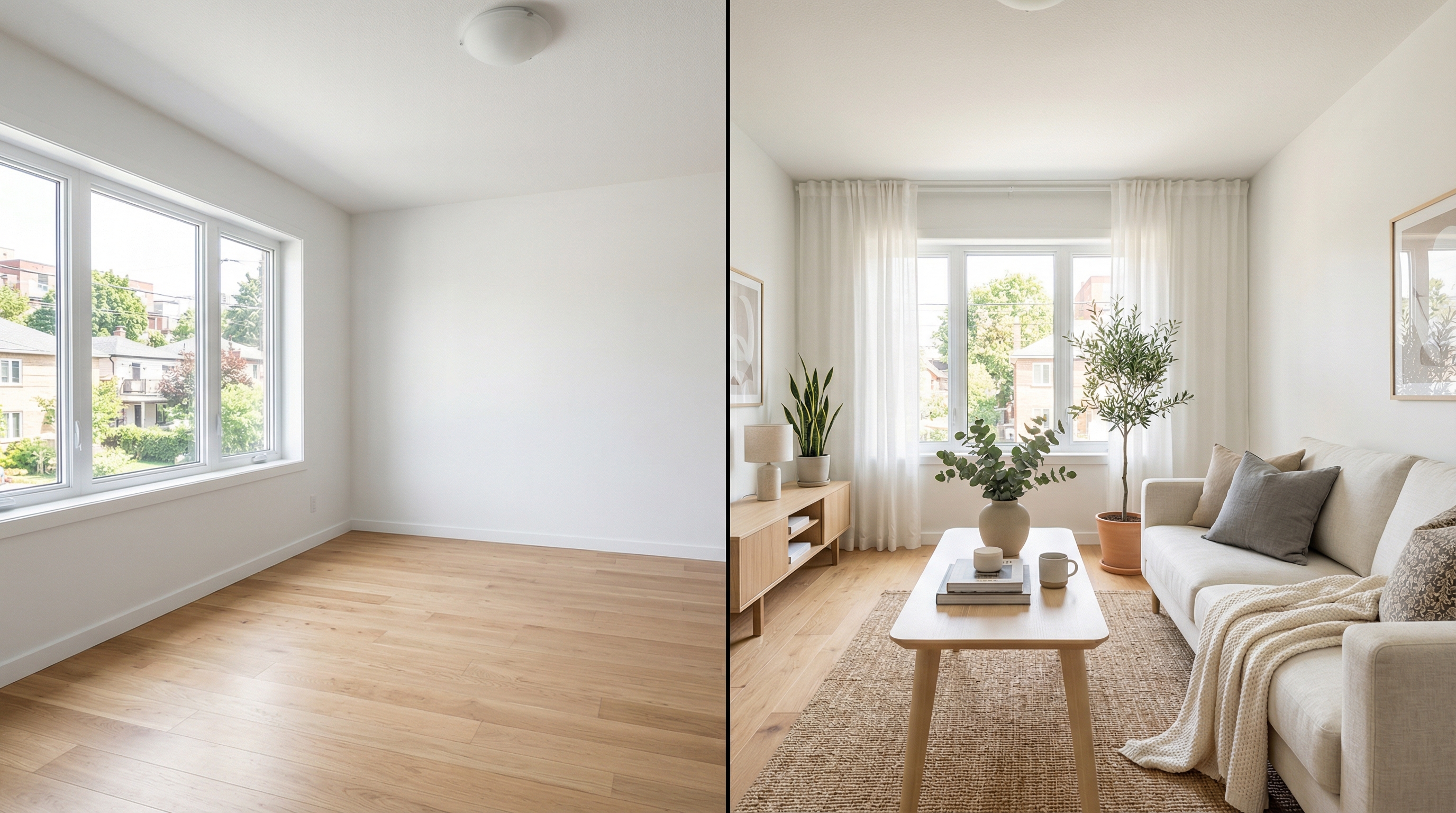
Virtual Staging for Property Managers: Fill Vacancies in Days, Not Months
A vacant unit doesn't just sit there quietly. It bleeds money. Every day a unit is empty, you're eating the mortgage, taxes, insurance, utilities, and the opportunity cost of rent you're not collecting. For a unit renting at $1,800/month, that's $60 per day. For a 50-unit portfolio with average 5% vacancy, that's $54,000 a year evaporating into nothing.
Property managers obsess over the right things: maintenance response times, lease renewals, tenant screening. But the one lever that gets weirdly underinvested is listing presentation — specifically, what the photos look like when a prospective tenant first sees the unit online.
Terrible photos are the silent killer of your vacancy rate.
How much does vacancy actually cost across a portfolio?
Let's do the math on a real scenario, because this is where the argument for virtual staging goes from "nice idea" to "obvious."
Say you manage 50 units. Average rent: $1,600/month. National average vacancy rate for professionally managed properties hovers around 6%, according to Census Bureau data — but let's say you're good at your job and you're running at 5%. That means at any given time, 2.5 units are vacant on average.
2.5 units x $1,600/month = $4,000/month in lost rent. That's $48,000 per year.
Now, what if better listing photos reduced your average vacancy duration by even one week? Just seven days.
If each of those 2.5 vacancies fills seven days faster, you're recovering roughly $933 per unit per year in reduced vacancy. Across the portfolio: about $12,000 annually. Not life-changing, but significant — and the investment to capture it is almost laughably small.
Virtual staging for all 50 units, assuming an average of 4 rooms per unit at $1 per room: $200. Total. For the entire portfolio.
That's a 60x return. And one week of reduced vacancy is conservative. Apartments.com data from 2025 showed that listings with staged or lifestyle photography received 40% more inquiries than listings with empty room photos. Forty percent. More inquiries means more applications, which means more choice, which means faster fills with better tenants.
Why do empty apartment photos perform so poorly?
Think about the last time you scrolled through rental listings. Every empty unit photo looks identical. White walls. Beige carpet or gray vinyl plank. A window. Maybe a ceiling fan. There is nothing — absolutely nothing — to differentiate one listing from another.
Now picture a unit staged in Scandinavian style. Light wood furniture, a cozy reading nook by the window, a simple dining setup. Suddenly the apartment has a personality. The prospective tenant can picture themselves there. They can see where their couch would go.
That visualization is what drives the click. And the click is what drives the inquiry.
Here's something property managers often overlook: you're not just competing with other vacant units. You're competing with occupied units where the current tenant took photos with their own furniture in the background. Those photos, even if they're messy and amateur, outperform empty room photos because they show the space being lived in. Virtual staging gives vacant units that same advantage — but with furniture that actually looks good.
How does a property manager scale virtual staging across a portfolio?
This is where virtual staging gets really practical for property management, because the operational lift is minimal.
Here's a workflow that works for portfolios of any size:
**Step 1: Build a photo library during turns.** Every time a unit turns over, photograph it after the make-ready is complete and before the new tenant moves in. Wide-angle shots of every room. This takes 15 minutes. If you're already doing this for condition documentation — and you should be — you're halfway there.
**Step 2: Batch-stage at the end of each week.** Collect all the photos from that week's turns. Upload them to Stagrr in one session. Select a style that matches the unit's character. For most market-rate apartments, Scandinavian or warm contemporary work universally well. For higher-end units, try modern minimalist or luxury modern.
**Step 3: Create a template listing with staged photos.** Build a listing template in your property management software with the staged photos already loaded. When the unit goes vacant next time — and it will — you've got professional marketing photos ready to go on day one. No scrambling, no delay.
This is the part that really matters for property managers: you photograph and stage each unit once, and you can reuse those images every time the unit turns. The layout doesn't change. The fixtures don't change. The photos are good for years unless you do a major renovation.
For a 50-unit portfolio, you might stage 8–12 units per year as they turn over. Within a few years, every unit in your portfolio has professional staged marketing photos. Total annual cost: maybe $40–$50. The ROI math is absurd.
Does virtual staging actually attract better tenants?
This one's counterintuitive but backed by data.
When your listing looks professional, it attracts a different caliber of applicant. A 2024 study by the National Apartment Association found that listings with professional photography attracted applicants with average credit scores 23 points higher than listings with amateur photos. The study's authors theorized that presentation signals property quality, and tenants who care about where they live gravitate toward properties that appear well-managed.
Think about it from the tenant's perspective. If you're a responsible person with a solid income and good credit, you have options. You're going to pick the apartment that looks best online. If your listing features dark, tilted phone photos of empty rooms, the tenants with options will scroll right past. The ones who don't have options — who apply to everything — are the ones who end up in your pipeline.
Better photos attract better tenants. Better tenants pay on time, take care of the unit, renew their leases, and create fewer management headaches. The downstream effects are substantial even if they're hard to quantify precisely.
How does virtual staging affect turn cycle time?
Vacancy has two phases: the time it takes to make the unit ready, and the time it takes to find a tenant. Most property managers focus on compressing the make-ready phase — faster maintenance, pre-ordered materials, efficient vendor scheduling. Smart operators have that dialed in.
The leasing phase is where virtual staging attacks.
Traditional timeline without staging: Unit photographed after make-ready (day 1–2). Photos uploaded to listing platforms (day 2–3). Inquiries start trickling in (day 5–10). Showings scheduled (day 7–14). Application received (day 10–21). Lease signed after screening (day 14–28).
With pre-staged photos: Listing goes live with staged photos the same day the previous tenant moves out — sometimes before make-ready is even complete (with a note on availability date). Inquiries start immediately because the photos are compelling. By the time the unit is ready for showing, you've already got multiple applications to review.
That overlap is the hack. You're running the leasing process in parallel with the make-ready process instead of in sequence. Some property managers report shaving 10–14 days off their vacancy cycle this way. At $60/day in lost rent, that's $600–$840 per turn per unit. Do that across 50 units with average 40% turnover annually, and you're looking at $12,000–$16,800 in recovered revenue per year.
What about furnished and short-term rentals?
If you manage furnished units or short-term rentals, virtual staging plays a slightly different role.
For furnished units, you can use AI staging to show the unit in its best light before the actual furniture arrives. This is useful for new units entering the rental market where furniture is on order. You can also re-stage a furnished unit virtually to show how it would look with updated furniture — useful for pitching an owner on a furniture refresh.
For short-term and vacation rentals, the photos are everything. Airbnb's internal data has consistently shown that listings with professional photos get 40% more bookings. But professional photography for a short-term rental is tricky because the space needs to be guest-ready and styled, which takes time and effort for each shoot.
Virtual staging lets you create aspirational photos that go beyond what the unit actually looks like day-to-day with guests cycling through. Stage the unit in the ideal arrangement — perfectly made bed, artful coffee table books, fresh flowers. Use those as your primary listing images. It's the version of the unit that exists when everything is perfect.
What MLS and listing platform rules apply to property managers?
Rental listings have different disclosure norms than for-sale listings, but the principle is the same: be transparent.
Most apartment listing platforms — Apartments.com, Zillow Rentals, Rent.com — don't have formal virtual staging disclosure requirements. But best practice is to note it anyway. A simple line in the description: "Photos are virtually staged to help you envision the space. Unit is rented unfurnished."
This protects you legally and practically. You don't want a prospective tenant showing up for a tour expecting the furniture in the photos. That's a wasted showing for both of you and starts the relationship on a sour note.
For property managers running ads on Facebook or Google, be aware that advertising regulations in some states require that images accurately represent the product. Virtual staging is generally fine as long as the staging represents furniture and decor that could plausibly be placed in the space — not structural changes, added windows, or expanded rooms.
What does a 50-unit portfolio transformation look like?
Let me paint the full picture for a property manager considering this.
Month 1: Photograph your first batch of turning units (let's say 4 units). Stage them. Upload staged photos to your listing templates. Cost: $16.
Month 2–6: Continue staging units as they turn. By month 6, you've staged 15–20 units. You're noticing inquiry volumes are up on the staged listings. Your leasing team mentions that prospects are commenting on how nice the apartments look online.
Month 12: 30+ units staged. You run the numbers and realize your average vacancy duration has dropped from 23 days to 16 days. That's 7 days fewer per turn. The math works out to thousands in recovered rent across the units that turned that year.
Month 18: Nearly every unit in the portfolio has staged photos. Your marketing is consistent and professional across every listing platform. You're winning more owner clients because your portfolio looks better than the competition's. One of your owners — the one with 12 units — told you at the last quarterly review that your marketing is the reason they haven't moved to another management company.
Total spend over 18 months: approximately $150. Total recovered revenue: conservatively $15,000–$25,000 in reduced vacancy costs, plus the unquantifiable benefit of better tenants and improved owner retention.
Where should property managers start?
Pick your highest-vacancy unit. The one that always takes longest to lease. Photograph it. Stage it. Relist it with the new photos. Watch what happens.
That's it. Don't overthink it. Don't build a committee. Don't create a policy document. Stage one unit and measure the results. If inquiry volume jumps — and it will — expand to every turning unit.
The barrier to trying this is so low it's basically lying on the ground. A dollar per room. Fifteen minutes of work. The only cost of being wrong is the price of a vending machine snack.
The cost of not trying is another year of preventable vacancy losses.